Printable OB wheel (free PDF)
A paper pregnancy wheel you can print, cut out and use — the same calendar and weeks layout clinicians have used for decades. Free for students, teachers and clinics.
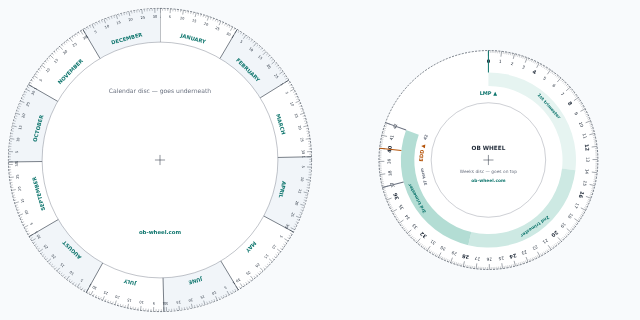
2 pages · A4 / Letter · PDF
Page 1: calendar disc (months and days). Page 2: weeks disc (0–42 weeks, trimesters, LMP and EDD arrows) and instructions.
How to make it
- Print both pages at 100%. Choose “actual size” in the print dialog so the scales line up. Card stock is sturdier than paper.
- Cut out the two discs. Cut along the outer circle of each. Cutting the inner disc slightly inside the line makes it turn more easily.
- Pin them together. Put the weeks disc on top and push a paper fastener (split pin) through both centre marks.
- Turn and read. Point the LMP arrow at the first day of the last period. Read the due date at the EDD arrow, and today’s gestational age where today’s date meets the weeks scale.
Paper wheel or online wheel?
A paper wheel is great for learning how dating works and for exams where devices aren’t allowed. Paper wheels can be a day or two out because of printing and month-length rounding, so for real dates use the online OB wheel, which does the arithmetic exactly and also dates from an ultrasound, conception or IVF. To practise the maths by hand, try the Naegele’s rule practice questions.
Frequently asked questions
How do I print the OB wheel at the right size?
Print both pages at 100% (“actual size”), not “fit to page”, on A4 or US Letter. Card stock works best. The outer disc is 18 cm across and the inner disc 13 cm.
How do I put it together?
Cut out both discs, place the smaller weeks disc on top of the calendar disc, and push a paper fastener (split pin) or drawing pin through both centre marks so the top disc turns.
How do I read it?
Turn the inner disc until the LMP arrow points at the first day of the last period on the outer calendar. The EDD arrow then points at the due date, and any date on the calendar lines up with the gestational age in weeks on the inner disc.
Can I use it in class or share it?
Yes. It’s free to print, copy and hand out for teaching and personal use. Please keep the ob-wheel.com credit on it.
Last meaningfully updated: 2026-10-20.